I like to travel with my Nintendo Switch 2. Every time I pack it up, I run into the same problem: the official dock is bulky and feels fragile. Therefore I never travel with it. It bothers me, because the dock uses USB-C DisplayPort Alt mode, and I already have a USB-C hub that supports it and works perfectly fine with all my other devices. Unfortunately, Nintendo went in a proprietary direction (as they so often do), so a regular generic hub will not work as a dock.
A friend had recently gifted me a USB-PD sniffer. I decided to take a look at what the console does and why it only works on an official dock.
The hub
The hub is a Cable Matters 7-in-1 triple display hub. It has DP, HDMI and VGA and delivers up to 60W of power. I took it apart to see what it has inside:
- VL103 USB-PD controller
- VL817 USB hub
- RTD2142 DisplayPort MST hub (here it’s used as the DP→HDMI converter)
- XT25F16B flash chips for firmware
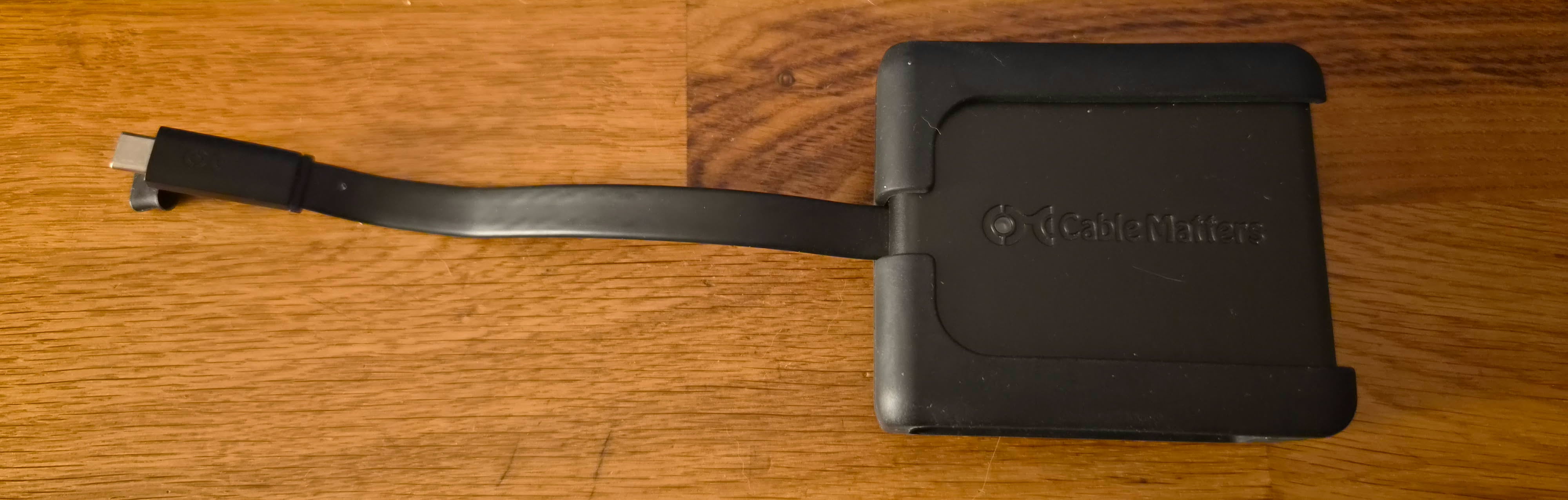
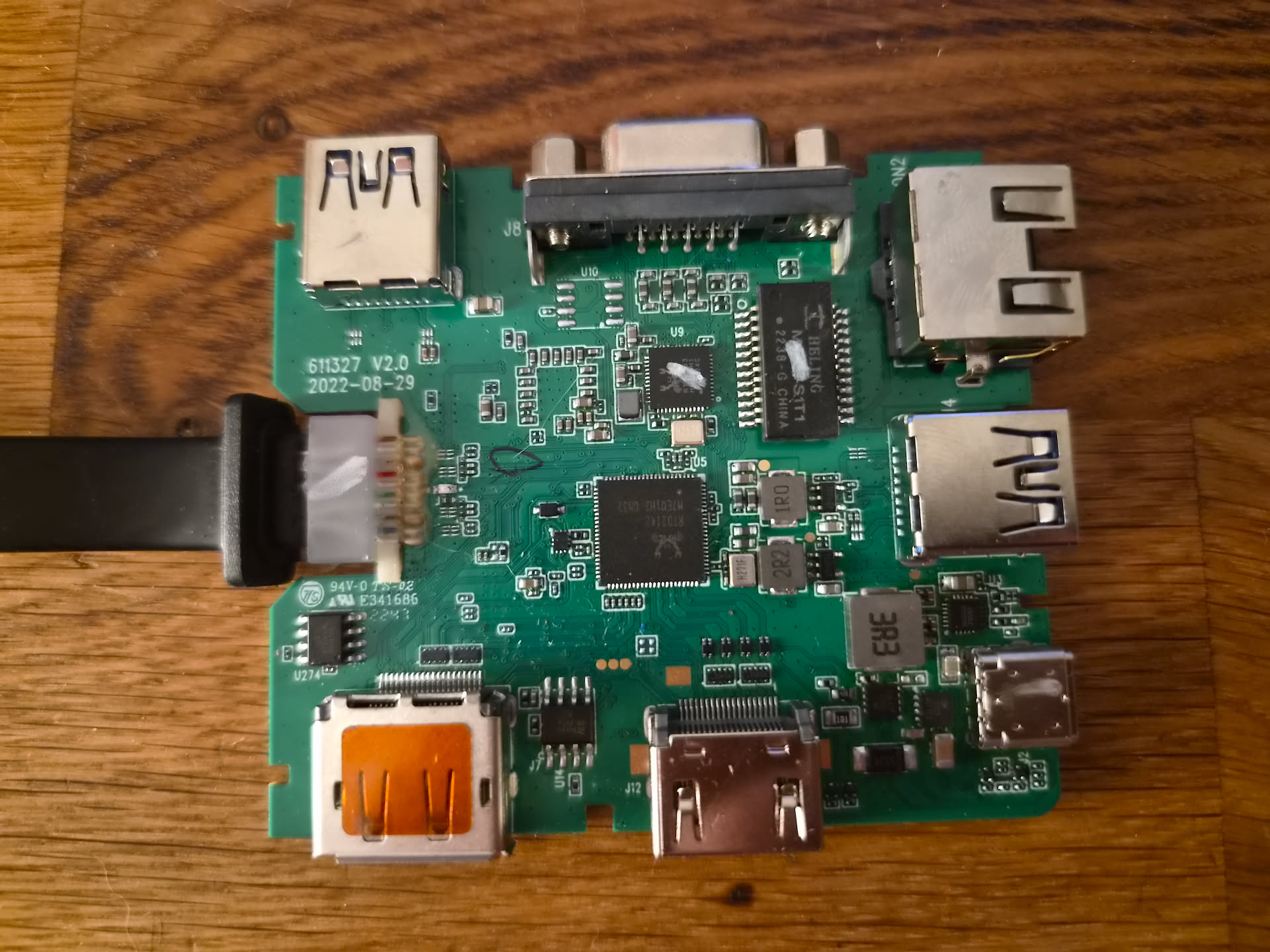
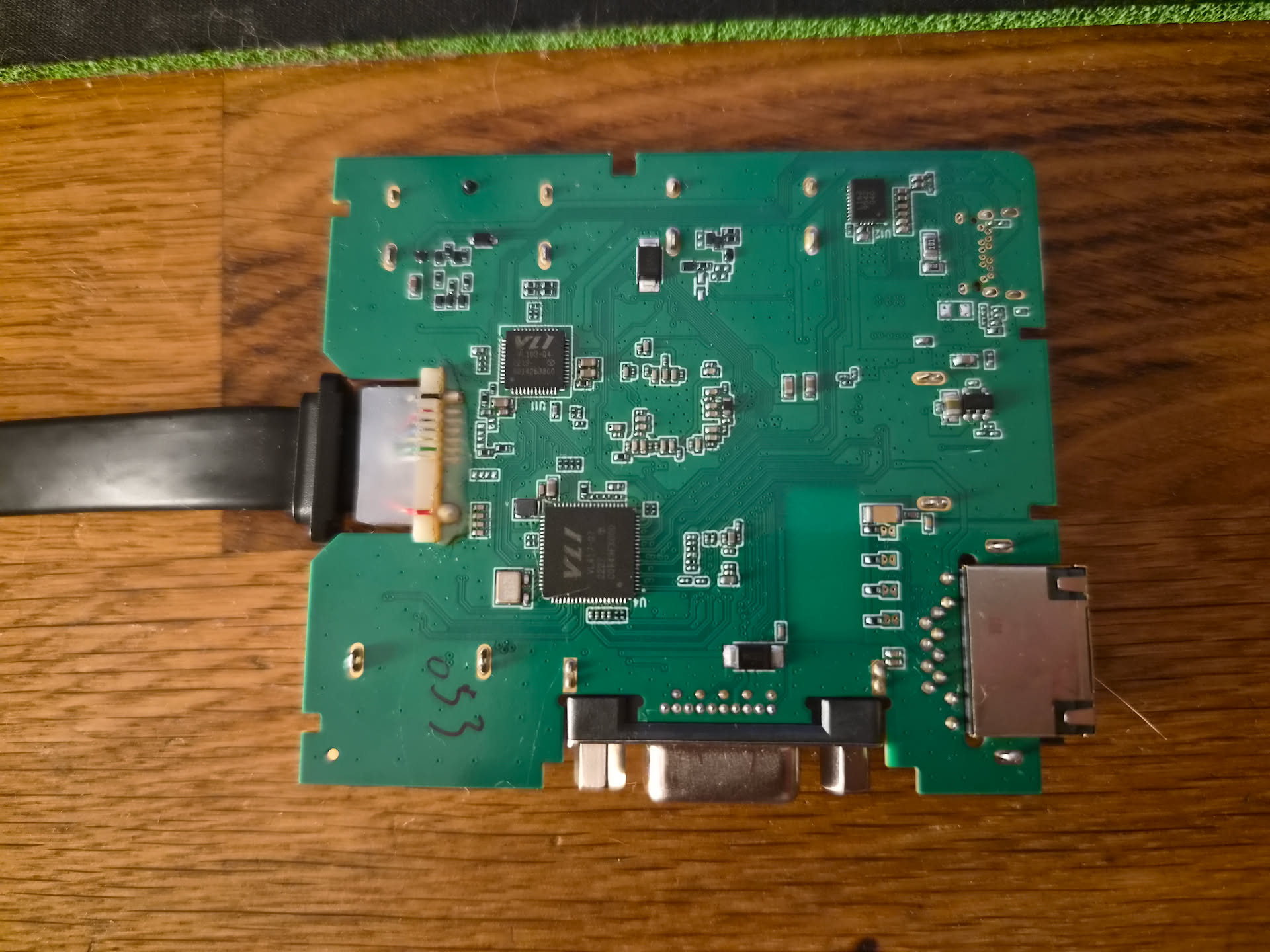
The Switch already charges with the hub, so it must use standard USB-PD. We can guess that the Nintendo specific docking negotiation happens over USB-PD vendor-defined messages.
With the stock firmware the Switch does get surprisingly far. It negotiates power, enters DisplayPort Alt Mode and even configures pin assignment D, all ACKed by the hub. Then nothing: no TV mode, no picture. DisplayPort Alt Mode alone isn’t enough, something else has to happen first.
Tools
USB-PD sniffer: The sniffer is a WITRN K2, which sits inline on the USB-C
cable and shows PD traffic. It only comes with a Windows app, so I had Claude
write a small Linux CLI for it. It reads the HID reports in a dedicated thread,
decodes them with usbpdparser and logs JSONL that I can replay later.
Updating the PD controller: The VL103 has an 8051 microcontroller with 32 KiB
of firmware. fwupd’s vli plugin already knows how to dump and flash it through
the VL817 hub, it only needed a quirk entry for this hub’s USB IDs. The image has
a CRC-16/USB at the end and plenty of erased space for new code.
sudo fwupdtool --plugins vli firmware-dump OUT.bin <device-id>
sudo fwupdtool --plugins vli --allow-reinstall --prepare --cleanup \
     install-blob patched.bin <device-id>
For reverse-engineering, I used Ghidra’s 8051 processor for disassembly, SDCC’s assembler for patches, and the uCsim 8051 simulator to run the real firmware against my captures.
Although I have some experience with 8051 programming, Claude and GPT were used extensively throughout this project. They helped with disassembly, patching and analyzing what the original hub firmware does. Without them, I would have had a much harder time getting this to work.
Listening to the official dock
I plug in the sniffer, run the sniffing script on my PC and observe USB-PD traffic:
14:19:11.863  SOP Source_Capabilities Source/DFP id=0  [F 5.0V@3.0A, F 9.0V@3.0A, F 15.0V@2.8A]
14:19:11.868  SOP Request Sink/UFP id=0  [[3] F 15.0V@2.8A]
14:19:12.070  SOP Vendor_Defined Sink/DFP id=4  VDM PD SID(0xFF00) Discover Identity REQ
14:19:12.073  SOP Vendor_Defined Source/UFP id=5  VDM PD SID(0xFF00) Discover Identity ACK  VDOs: 0x5460057E 0x00000000 0x20620000 0x65000031 0x00000000
14:19:12.080  SOP Vendor_Defined Source/UFP id=6  VDM PD SID(0xFF00) Discover SVIDs ACK  SVIDs: DisplayPort(0xFF01), Nintendo(0x057E)
14:19:12.162  SOP Vendor_Defined Sink/DFP id=0  VDM Nintendo(0x057E) Enter Mode REQ  mode #1
14:19:12.183  SOP Vendor_Defined Sink/DFP id=1  VDM DisplayPort(0xFF01) Enter Mode REQ  mode #1
14:19:12.210  SOP Vendor_Defined Sink/DFP id=3  VDM DisplayPort(0xFF01) 17 REQ  VDOs: 0x00000806
14:19:12.228  SOP Vendor_Defined Sink/DFP id=4  VDM/unstructured Nintendo(0x057E) 0x0001  VDOs: 0x00000020
14:19:12.240  SOP Vendor_Defined Source/UFP id=5  VDM/unstructured Nintendo(0x057E) 0x0041  VDOs: 0x00000020 0x00000000
14:19:12.249  SOP Vendor_Defined Sink/DFP id=5  VDM/unstructured Nintendo(0x057E) 0x0001  VDOs: 0x00000001
14:19:12.260  SOP Vendor_Defined Source/UFP id=6  VDM/unstructured Nintendo(0x057E) 0x0041  VDOs: 0x00000001 0x03010503
14:19:12.438  SOP Vendor_Defined Sink/DFP id=6  VDM/unstructured Nintendo(0x057E) 0x0001  VDOs: 0x00000002
14:19:12.450  SOP Vendor_Defined Source/UFP id=7  VDM/unstructured Nintendo(0x057E) 0x0041  VDOs: 0x00000002 0x0003006E
14:19:12.458  SOP Vendor_Defined Sink/DFP id=7  VDM/unstructured Nintendo(0x057E) 0x0001  VDOs: 0x00000006
14:19:12.471  SOP Vendor_Defined Source/UFP id=0  VDM/unstructured Nintendo(0x057E) 0x0041  VDOs: 0x00000006 0x330107DA 0x06016D68 0x330107DA 0x06016D68
A few things stand out:
- Discover Identity: the dock identifies as Nintendo (VID
057E), product2062, a “peripheral”. - Discover SVIDs: besides DisplayPort (
FF01) the dock advertises Nintendo’s own SVID,057E. The Switch enters a Nintendo mode before the DisplayPort one. - Nintendo messages: after DP is configured, the Switch sends a series of
unstructured vendor messages. Each request is
057E0001+ a command number, and the dock replies057E0041+ the same command + data.
| Command | Dock’s reply | Notes |
|---|---|---|
20 | 00000000 | also polled periodically |
01 | 03010503 | |
29, 44, 41, 49, 23, 131, 51 | echo | |
02 | 0003006E | looks like a version number |
06 | 330107DA 06016D68 ×2 | version record, tag hm |
04 | 330107DA 06016D61 ×2 | version record, tag am |
I don’t know what most of these mean. The version records match the layout of
Cypress/Infineon CCGx firmware versions, and another dock-patching project saw
02 change with an official dock update.
Teaching the hub the handshake
I started by getting the VL103 firmware and asked Claude to decompile and analyze it. When it tried to use Ghidra, I was immediately met with a safety classifier stop. So the decompilation tasks were performed by GPT instead.
I added a responder to the VL103 firmware: about 540 bytes of 8051 code in the erased area, hooked into the stock PD stack so it answers Nintendo’s messages and leaves everything else to the original code. Then I changed one thing at a time:
| Version | Change | Result |
|---|---|---|
| v1/v2 | answer Nintendo Discover/Enter Mode and the echo commands | ACKs on the wire, DP configured, no picture |
| v3 | offer 15 V / 2.8 A like the dock (stock hub: 2.53 A) | no picture |
| v4 | report Nintendo’s vendor ID instead of VIA’s | no picture |
| v5 | return the official dock’s complete identity | TV mode works! |
| v6 | answer 02 with the dock’s version | Switch now stalls on 06 |
| v7 | answer 06 and 04 with the dock’s records | full sequence matches, docking is faster |
v4 vs v5 was the interesting one: the vendor ID alone isn’t enough, the Switch
checks more of the identity. v7 got rid of a ~3 second pause. With v5 the Switch
asked for 02, got “Not supported” and waited before carrying on.
The version replies are copied from the official dock, they aren’t real versions of anything in this hub, and nothing behind those commands is implemented. Any command I don’t recognise still gets the stock “Not supported” answer.
HDR looks washed out
TV mode worked, but with HDR on the colours looked noticeably desaturated. The official dock on the same monitor and the same game looked fine. What I ruled out:
- The display: the same thing happens on my monitor and on my TV, and the HDR indicator lights up on both.
- RGB range: limited makes it worse, full is still washed out.
- The hub in general: my Linux PC does HDR through the same hub correctly.
- The PD controller: PD traffic is identical with HDR on and off.
The picture looked like the colorspace was mismatched, so my theory was that the Switch sends BT.2020 colour, but the display gets told it’s BT.709 and squashes the colours. The DisplayPort side never touches the PD controller, it goes straight to the RTD2142. So that chip was next.
Inside the RTD2142
First, I had to dump its firmware. flashrom has a realtek_mst_i2c_spi programmer
that talks to the chip over I²C-over-DP-AUX, through the same USB-C cable. Two
reads gave identical 2 MiB images. The firmware isn’t signed, so a modified image
can simply be flashed (and a SOIC-8 clip was my backup plan).
flashrom -p realtek_mst_i2c_spi:bus=7,allow_brick=yes,reset_mcu=1 -r rtd2142.bin
Analysis: It’s another 8051, this time with eight 64 KiB banks of code switched through trampolines. I extended my simulator to follow bank switches. The biggest help was a Realtek tool database for the related RTD2172 that I found in a public GitHub repo: it has names and descriptions for the hardware registers, and they matched what this firmware does.
The HDMI output describes the colour of the picture in an AVI InfoFrame, a small packet sent along with the video. Its colorimetry fields said BT.709. The converter only takes BT.2020 from the incoming DisplayPort stream when it’s signalled in one specific standard way, and it only refreshes the HDMI colour label when the output starts up. HDR brightness metadata goes through a separate packet, which is why the TV still switched to HDR mode.
I looked up how other third party docks handle it. They’ve shipped firmware updates that “fix grey or dim HDR”. One of them contains the debug string “switch2 color space patch”: when it sees a Switch 2 and the stream isn’t marked BT.2020 the standard way, it takes the colorimetry from the display’s EDID instead. So I wasn’t the only one hitting this.
The HDR fix
Rather than detecting a Switch, my patch looks at the HDR metadata itself:
- if HDR metadata is present and its transfer function is PQ or HLG, every AVI InfoFrame gets marked as BT.2020 and its checksum is fixed.
- the InfoFrame is rebuilt whenever HDR switches on or off.
- nothing else changes: same pixels, same packets for SDR, nothing in the DP or startup path.
It’s 108 bytes in a single bank: three small hooks and some code in erased padding. Before flashing it I ran the original firmware plus the patch in the simulator: all pixel formats, HDR on/off transitions and a full input-to-output chain.
Result: HDR looks right. The pixels were fine all along, only the label was wrong.
The hub’s DisplayPort output uses a different path that I didn’t patch, so HDR through the DP port is still washed out. I decided I do not care enough to fix it :)
VRR?
Because the hub now pretends to be the official dock, the Switch also offers VRR. Enabling it froze the picture through the DP port, and on the HDMI port the refresh rate just stayed at 60 Hz. Looking at the firmware: it has no VRR support at all. It never tells the source it can handle variable timing, and it never sends the HDMI VRR packet.
Because I wanted a complete docking solution, I still tried. The RTD2142 firmware turned out to have a debug interface on I²C address 0x35 over the same AUX channel: one command reads any register, another writes one. That let me read the chip’s live state and poke registers without flashing anything.
To get a source that actually uses VRR, I made a second patch so the hub advertises Adaptive-Sync, and gave Linux an EDID override. amdgpu then happily enabled VRR, and the screen went black as soon as the frame rate actually varied. The chip’s main loop stopped answering until the timing was steady again. It wasn’t rebooting, and turning off its FIFO watchdog and interrupts didn’t help. My best guess is a clock re-lock loop that never settles.
Making it work would mean rewriting how the chip locks onto the input, hoping its timing generator can follow variable frames, and adding the HDMI VRR packet. I called it there and went back to the HDR-only firmware. I just turn VRR off in the Switch settings when using a hub like this.
Conclusion
The hub now works as a travel dock for what I care about: TV mode and HDR over HDMI, with the Switch charging at the same time. I didn’t really test the USB ports or Ethernet. VRR doesn’t work, so I keep it turned off in the Switch settings. In total, the hub needed about 540 bytes in the PD controller and 108 bytes in the RTD2142.
Even though the hub now reports itself as an official Nintendo dock, it still works normally with my PC and my phone.
Shoutout to VIA and Realtek for putting 8051 chips in there since it makes hacking much simpler and more accessible :)